Overview of best OCR tools
Overview of tools for effective OCR on PDF files. This article will help you improve the quality of text extracted from your documents! 📄

Info
Update from January 2026: the article has aged a bit :)
Many OCR benchmarks have emerged - I won’t name them, as better ones could appear at any time ;) From current models, I recommend looking into PaddleOCR-VL.
What is OCR and what is it used for?
OCR (Optical Character Recognition) is the process of recognizing text within an image. OCR is useful if we want to process text from an image in any way:
- copy the content of a scanned page;
- translate text from a photo;
- scan a receipt
OCR will also prove useful when building a database of scanned documents that we would later like to search through :)
Tools Overview
Tesseract
Tesseract is one of the most well-known OCR tools. The project includes both a CLI tool (tesseract) and the OCR engine itself (libtesseract).
The project supports over 100 languages and has UTF-8 support.
The tool cannot be used directly on PDF files. It takes images as input, so we must first convert the PDF file into a series of images.
Among other things, Tesseract struggles with handwriting:
It’s possible to train tesseract to recognize handwriting. […] But don’t expect very good results. Academics have typically gotten accuracy results topping out about 90%. Here are a couple references for words and numbers. So if your use case can deal with at least 1/10 errors, this might work for you.
The input should be as free of artifacts as possible (which may occur with scanned documents, for example) for Tesseract to achieve optimal results. As output, we get plain text - Tesseract will not extract the document structure, such as headers.
Tesseract is covered by the Apache 2.0 license, which allows for both commercial and hobbyist use.
OCRmyPDF
OCRmyPDF is a full-fledged tool for converting PDFs.
The OCR engine used is the previously mentioned Tesseract. OCRmyPDF adds a layer allowing for PDF processing before OCR execution - for example, it can remove noise, correct page rotation, or remove the ‘scanned text’ look. Moreover, the tool can be run directly on PDF files.
We can definitely use this tool if we don’t care about structured text. The program is great for extracting plain text, as well as overlaying scanned text onto the file :)
We control the program from the command line:
ocrmypdf                      # it's a scriptable command line program
   -l eng+fra                 # it supports multiple languages
   --rotate-pages             # it can fix pages that are misrotated
   --deskew                   # it can deskew crooked PDFs!
   --title "My PDF"           # it can change output metadata
   --jobs 4                   # it uses multiple cores by default
   --output-type pdfa         # it produces PDF/A by default
   input_scanned.pdf          # takes PDF input (or images)
   output_searchable.pdf      # produces validated PDF output
OCRmyPDF is covered by the MPL 2.0 license, which enables commercial use:
The OCRmyPDF software is licensed under the Mozilla Public License 2.0 (MPL-2.0). This license permits integration of OCRmyPDF with other code, included commercial and closed source, but asks you to publish source-level modifications you make to OCRmyPDF.
Nougat
Nougat is a specialized tool from Meta for processing academic PDFs, supporting tables and equations. The output is in Markdown format with equations in LaTeX format.
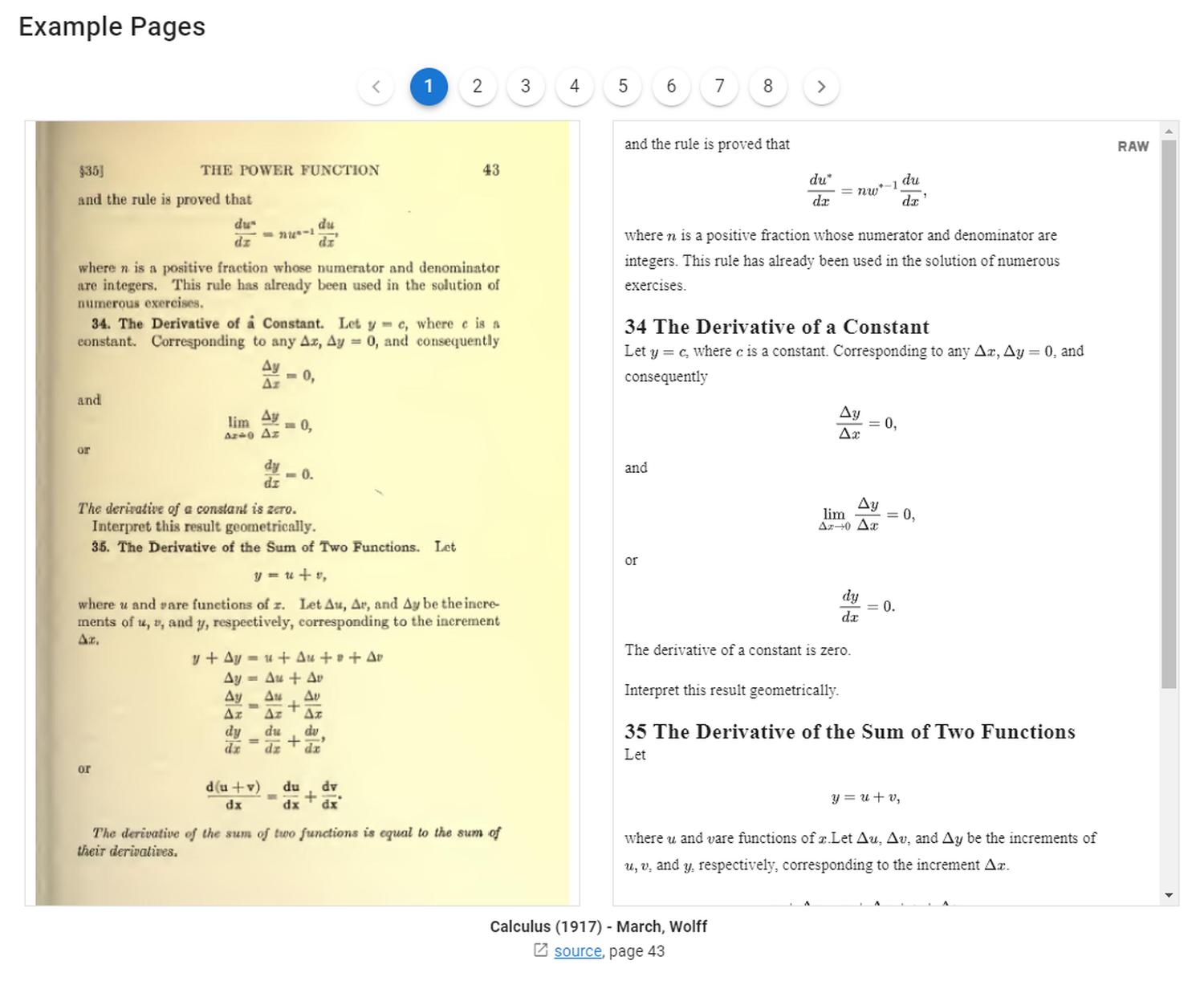
The model works best on scientific documents, similar in structure to those from arXiv. Using Nougat on documents from a different domain significantly worsens accuracy.
Nougat utilizes the Transformer architecture. As a result, the model is prone to hallucinations:
Relying on autoregressive forward passes to generate text is slow and prone to hallucination/repetition. From the nougat paper: We observed [repetition] in 1.5% of pages in the test set, but the frequency increases for out-of-domain documents. In my anecdotal testing, repetitions happen on 5%+ of out-of-domain (non-arXiv) pages.
The model weights are licensed under the CC-BY-NC license, which means we cannot use Nougat for commercial solutions.
Marker
Marker is the most advanced tool in this lineup for converting PDF files to Markdown format.
Marker extracts structured text in Markdown format, equations, and tables from files of any topic. The tool is 10x faster than Nougat, ensures higher accuracy, and limits the risk of hallucinations solely to processed LaTeX equations.

Under the hood, Marker uses several tools:
Marker is a pipeline of deep learning models:
- Extract text, OCR if necessary (heuristics, tesseract)
- Detect page layout (layout segmenter, column detector)
- Clean and format each block (heuristics, texify)
- Combine blocks and postprocess complete text (heuristics, pdf_postprocessor)
The weights of the used models are licensed under CC-BY-NC, which means we cannot use Marker for commercial solutions. The project itself is licensed under the copyleft GPL-3.0 license.
Installing Marker on WSL2
I will show you how to install Marker on WSL2 (Ubuntu 20.04). I base this instruction on the documentation in the Marker repository:
Let’s start by installing Poetry:
curl -sSL https://install.python-poetry.org | python3 -
Let’s make sure Poetry is installed:
$ poetry --version
Poetry (version 1.7.1)
If so, let’s clone the repository:
git clone https://github.com/VikParuchuri/marker.git
cd marker
Next, we need to install system dependencies:
chmod +x scripts/install/tesseract_5_install.sh
scripts/install/tesseract_5_install.sh

chmod +x scripts/install/ghostscript_install.sh
scripts/install/ghostscript_install.sh

cat scripts/install/apt-requirements.txt | xargs sudo apt-get install -y
Next - let’s configure the path to Tesseract:
$ find /usr -name tessdata
/usr/share/tesseract-ocr/5/tessdata
$ nano local.env
TESSDATA_PREFIX=/usr/share/tesseract-ocr/5/tessdata
Then, let’s activate the Poetry environment and install dependencies. In my case, I am installing using the CPU-only method. If you want to use a GPU, check the documentation.
poetry shell
poetry install
pip3 install torch torchvision torchaudio
Info
In case of problems with packages or poetry, it’s worth deleting the cache and regenerating the lock file.
Note - this will delete all existing Poetry environments!
rm -rf ~/.cache/pypoetry/
poetry lock --no-update
Extracting Markdown content from a PDF file
After installing Marker, we can convert PDF to MD - using the example of converting pdf1.pdf > pdf1.md:
poetry shell
python convert_single.py pdf1.pdf pdf1.md --parallel_factor 2
It is worth configuring the local.env file to achieve optimal result quality:
# DEFAULT_LANG should be set according to the processed document
DEFAULT_LANG=Polish
# Let's activate additional post-processing:
ENABLE_EDITOR_MODEL=true
That’s all for today. Thanks for reading the article! :)
You can follow my blog with any
 RSS reader!

Maciej Kaszkowiak
I try to write about interesting things, such as artificial intelligence, created projects, and travel - see all posts.
Query rewriting - refine user queries
What is query rewriting? Why is it useful whenever you build a chatbot? How to implement it? Read the article!
BM25: keyword search
Improve search in your application! Implement BM25: discover how it works, learn about potential issues, and get practical advice 🚀

Even your cat poem generator requires proper tests
Benchmark your AI application. Learn why and how to do that!